
Blackboard Quick Start Guide For Students
johnsonl@gram.edu
Blackboard Quick Start Guide For Students
johnsonl@gram.edu
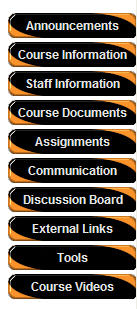
Announcements
– timely information critical to class success.
Course Information – Syllabus, class objectives,
class management information.
Staff Information – contact information, office
hours, etc. for instructor/teaching staff.
Course Documents – includes learning materials
and lesson aids, such as lecture notes.
Assignments – lists the due date and description
for class work. Students may view files the instructor has attached to an assignment.
They may also attach files to an assignment to submit to the instructor.
Communication – Course users communicate through
the Communication Center. The Communication Center allows user to:
Send e-mail
Read and post messages to the Discussion Board
Enter Collaboration Sessions
View student roster
View group pages
External Links – connects course users to outside
learning materials. Instructors may select outside materials and post a hyperlink
and brief description for each external source
Tools – Tools that can be used in the class
site:
Digital Drop Box
Edit Home Page
Personal Information
Course Calendar
View Grades
Student Manual
Tasks
Course Videos– Contains videos the instructor
has uploaded relevant to the course
*Links may differ from course to course
 7/13
7/13 